How Circle reads a sheet
Circle is a port of a Python reader to the browser. Here is everything it does to one sheet, with the real numbers from the sample on the home page.
One sheet, on purpose
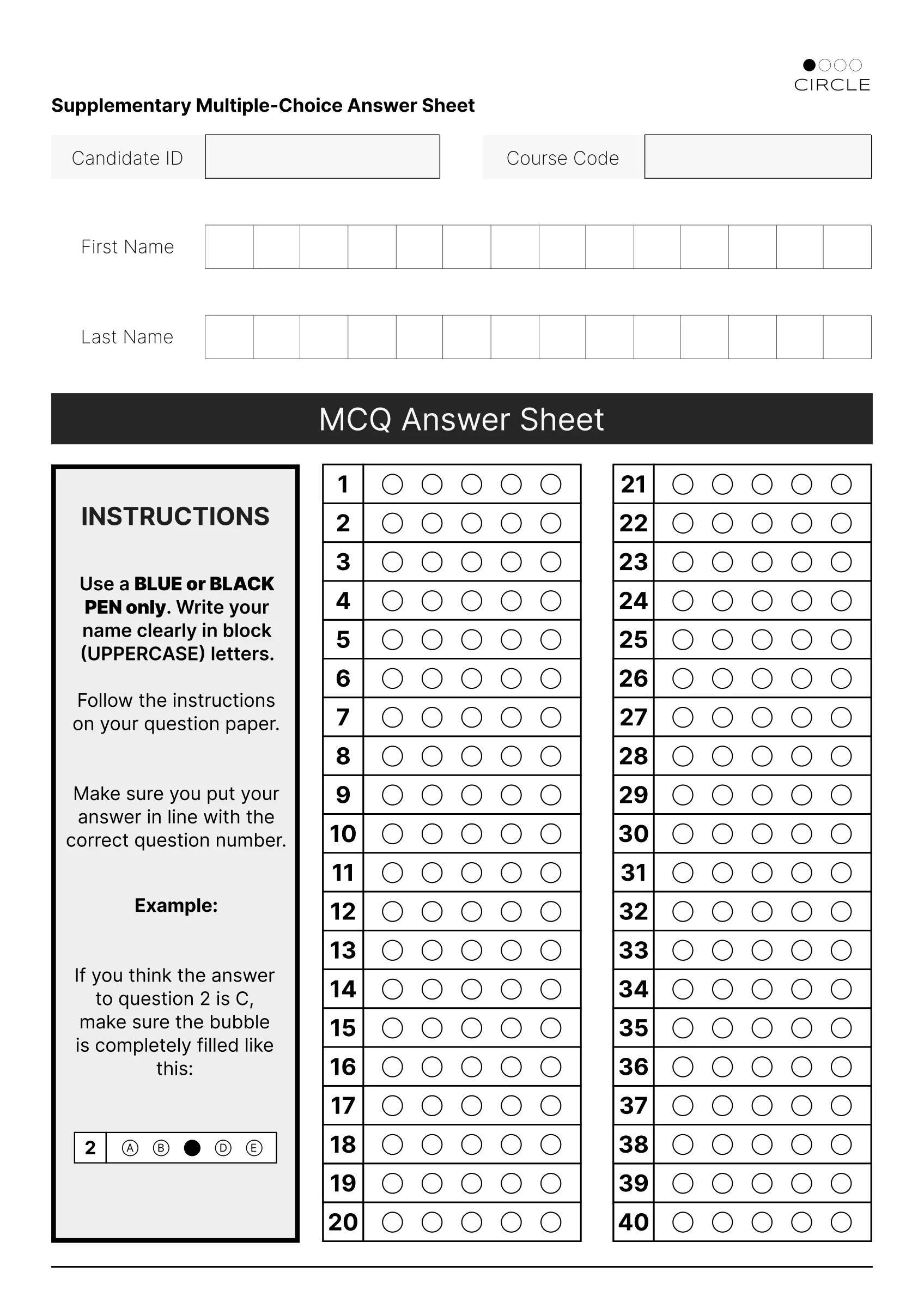
Circle reads only its own A4 answer sheet. Knowing the layout in advance is what makes it fast and dependable: two grids of 20 rows, a number column and five bubbles per row, and two name rows of 14 boxes each.
If a photo is not this sheet, or a grid is cut off, Circle says so instead of guessing.
A4 · 2 grids × 20 rows × (1 + 5) cells · 2 × 14 name boxes
Ink from paper
The scan is turned grey and softened slightly (a 5 by 5 blur) so paper grain and JPEG noise drop away.
Then every pixel is compared with the 11 by 11 pixels around it. A pixel darker than its neighbourhood is ink. This local rule is why a shadow from your hand or a pale photocopy still reads cleanly.
GaussianBlur 5×5 · adaptiveThreshold gaussian, block 11, C 2
The two answer grids
Circle traces the outline of every shape on the page. On the sample that is 845 outlines. It keeps the three with the largest area and simplifies each to four corners.
The leftmost of the three is the instructions box, so it is set aside. The other two are mapped onto flat rectangles, which undoes the tilt of a phone photo.
findContours · 3 largest · approxPolyDP 2% · getPerspectiveTransform
Four tests per bubble
Each grid is cut into a 20 by 6 table of cells. The five bubble cells in every row get four measurements: how many edge pixels it has, how much the brightness varies, what share is dark, and how many pixels are black after an automatic threshold.
The cut-offs are not fixed. Circle looks at all 200 bubbles on the sheet, drops the outliers, and sets each cut-off two median deviations away from the typical empty bubble. A filled bubble stands out from its own sheet.
Canny 100/200 · Otsu · IQR filter · median ± 2 MAD
Question 1 on the sample. A was filled. Bubble Edges Variance Dark Black Passes A 472 11,523 25.3% 4,732 4 of 4 B 652 3,707 7.5% 1,470 0 of 4 C 647 3,758 7.6% 1,489 0 of 4 D 651 3,728 7.6% 1,464 0 of 4 E 644 3,820 7.6% 1,434 0 of 4 Cut-off < 631 > 8,069 > 19.0% > 3,485 Deciding
A bubble that passes two or more of the four tests counts as filled. One filled bubble in a row is the answer. None is a blank. Two or more is flagged for you, never guessed: on the sample, rows 3, 4, 5, 6, 15 and 25 are flagged that way.
≥ 2 of 4 tests = filled · 1 filled = answer · 0 = blank · 2+ = flagged
Reading names
The name rows are found as the two wide boxes in the top half of the page. Each is cut into 14 boxes, trimmed to the ink, and joined back into one clean strip.
Letters are separated, scaled to 28 by 28 pixels and read by a small convolutional network with 26 outputs, one per letter. A letter it is less than 90% sure about is left out, so a smudge does not turn into a wrong name. You can edit any name before exporting.
14 boxes · adaptive mean 41/25 · 28×28 CNN, 4 conv layers · keep > 0.90
A 1.00 · H 0.91 · S 1.00 · A 1.00 · N 1.00 M 1.00 · I 0.99 · R 1.00 Marking
With your key, each row becomes a mark: green on a right answer, red on a wrong pick with the right answer ringed in yellow, and yellow alone on a blank or flagged row. The score is the count of greens. Questions without a key are left out of the total.
score = rows where the single filled bubble matches the key
The same answers as the original
The browser reader is checked against the original Python engine on identical images: the sample, two rotations, half size, a skewed photo, heavy JPEG compression and a darker exposure. Every answer, every bubble position and every name match.
- sample
- rotated 2°
- rotated −1.2°
- half size
- skewed photo
- JPEG quality 50
- darker
What it will not do
- Read any sheet other than the Circle sheet.
- Grade more than 40 questions, or options beyond A to E.
- Read digits, spaces or accented letters in names. It reads A to Z.
- Decide between two filled bubbles. Those rows wait for you.
- Read a photo where either answer grid is cut off or badly blurred.